
On this page
Picture an AI agent working through a support backlog. The AI workflow runs for 45 minutes and calls a dozen APIs. Right before it finishes, the model provider returns a timeout, and the agent crashes. Nothing was saved, so you restart from zero and pay for every one of those calls again.
This kind of failure often shows up in payment retries, deep research agents, and multi-day approval chains alike. Cadence, Temporal, and Kitaru all exist so that it never has to happen. All three have a slightly different approach to resolving this pain:
- Cadence starts from governed, high-volume backend workflows
- Temporal starts from workflows and activities
- Kitaru starts with the agent run itself and replayable checkpoints
The question is which one matches how your team already builds.
This Cadence vs Temporal vs Kitaru guide will walk you through what each one solves and how the architectures actually differ. By the end, you’ll be able to decide on a runtime that matches the shape of your workload.
Cadence vs Temporal vs Kitaru: Key Takeaways
- Kitaru: A replayable runtime layer built for Python agent runs. It’s built for AI engineers running long-lived agents that call models, tools, humans, and agent frameworks. It sits under your existing agent stack and records everything as replayable checkpoints.
- Cadence: An open-source workflow orchestration engine for large-scale backend systems. It is now a CNCF Sandbox project, and it is best when your team wants open governance and full control over the service, workers, persistence stores, and visibility infrastructure.
- Temporal: A deterministic, durable workflow engine for application code across many languages. It is best when you need a mature orchestration platform with strong recovery guarantees and want the option to choose between Temporal Cloud and a self-hosted Temporal Service.
What Problems Are These Tools Actually Solving?
When a long-running process crashes halfway through, the system has to decide what happens next. The default behavior in most software is to start over completely.
However, the restart doesn’t always go as planned, does it? You may repeat model calls. You may redo tool executions. You may lose the human approval state. Worst of all, you may also lose the context needed to understand what happened before the crash.
Cadence, Temporal, and Kitaru all solve parts of this problem. The difference lies in the type of workload each was built around.
Cadence
Cadence solves durable orchestration for fault-tolerant backend workflows. It started as Uber’s answer to workflow chaos across a sprawl of microservices. What sets Cadence apart is how it handles many teams sharing a single platform. Domains give each team its own isolated namespace, with separate quotas and rate limits. These controls reduce noisy-neighbor problems when many teams share one Cadence environment.
Temporal
Temporal solves durable execution for application code across many languages. Interestingly, it was created by the members of the team behind Cadence, and it keeps the core workflow idea while improving the developer experience across more SDKs.
You define Workflows and Activities in normal programming languages, persist event history, recover state after failure, and choose between Temporal Cloud and a self-hosted Temporal Service.
Overall, a strong fit when your workload is a serious backend workflow system. But your team usually needs to split agent logic into Workflows and Activities first.
Kitaru
Kitaru solves durable execution for long-running Python agents. It starts with the agent running itself, rather than asking you to first turn that run into a business workflow or event function. It wraps a Python agent, records steps as checkpoints, and lets you replay from any saved point.
It sits below the harness, so you can keep using Pydantic AI, LangGraph, OpenAI Agents SDK, Claude Agent SDK, or raw Python.
Comparing Cadence, Temporal, and Kitaru features
Before we dive into the feature comparison, here’s a quick table showing how Cadence, Temporal, and Kitaru differ from each other:
| Feature | Cadence | Temporal | Kitaru |
|---|---|---|---|
| Durable execution (survive crashes without restarting) | ✅ | ✅ | ✅ |
| Pause for human input without holding compute | ✅ Signals + timers | ✅ Signals, Updates, timers | ✅ Built-in wait() |
| Code free of determinism rules | ❌ Workflow code must be deterministic | ❌ Workflow code must be deterministic | ✅ No constraints between checkpoints |
| Large payloads (LLM contexts, files) | ~2 MB cap; DIY offload | ~2 MB cap; custom payload codec | ✅ Artifacts offload to S3, GCS, Azure Blob |
| Works with existing agent frameworks unchanged | ❌ | OpenAI Agents SDK only (public preview) | ✅ Pydantic AI, OpenAI Agents SDK, Claude Agent SDK, LangGraph |
| SDKs beyond Python | ✅ Go, Java | ✅ Go, Java, TypeScript, .NET, PHP, Ruby | ❌ Python only |
| First-party managed cloud | ❌ Third-party only (Instaclustr) | ✅ Temporal Cloud | ZenML Pro manages the control plane; execution stays in your infra |
Let’s now deep dive into the features that matter the most.
Feature 1. Durable Execution
Durable execution means the work survives failures. The runtime records enough progress that a crash does not force the whole job to start again.
Kitaru
import kitaru
from kitaru import checkpoint, flow

@checkpoint
def research(topic: str) -> str:
    return kitaru.llm(f"Summarize {topic} in two sentences.")

@checkpoint
def draft_report(summary: str) -> str:
    return kitaru.llm(f"Write a short report based on: {summary}")

@flow
def research_agent(topic: str) -> str:
    summary = research(topic)
    return draft_report(summary)

if __name__ == "__main__":
    # Run, then replay from a checkpoint with one input changed.
    run = research_agent.run(topic="Why do agents need durable execution?").wait()

    baseline = research_agent.replay(run.exec_id, at="draft_report")
    variant = research_agent.replay(
        run.exec_id,
        at="draft_report",
        flow_overrides={"model": "anthropic/claude-opus-4"},
    )
    # baseline reproduces the original; diff variant against it to isolate your change.
Kitaru approaches recovery through replayable checkpoints.
A checkpoint might be a complex model call, a tool execution, or a Python function wrapped with Kitaru primitives. If the agent crashes after that point, Kitaru reuses the stored output. You get to skip calling the model or tool a second time.
That matters when you are paying AI usage bills. In a backend workflow, the expensive part may be compute or database work. In an AI agent, it is often the model call and the tool chain around it.
Kitaru also stores the context around a checkpoint. That includes artifacts, execution history, and wait state. So before you resume or replay an agent, you can inspect what happened and decide where to continue.
Cadence
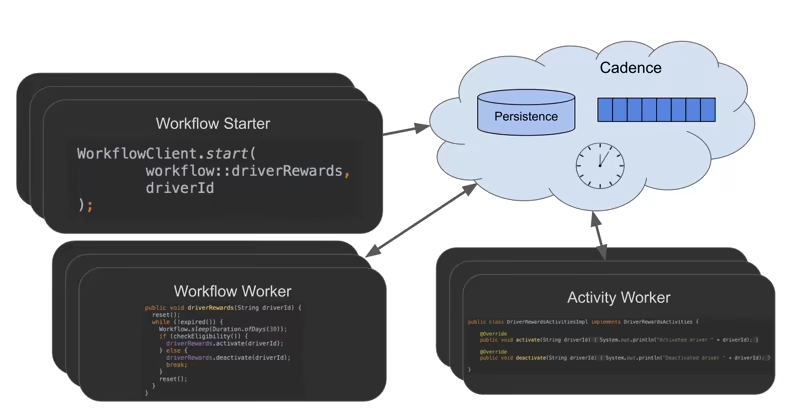
With Cadence, you write workflow coordination logic as ordinary application code that survives process restarts, infrastructure failures, and pauses.
The trick of the trade is that Cadence stores the workflow’s progress in the Cadence service, not in the worker’s memory. The worker runs the code, but the worker is not the source of truth. If it dies, another worker can rebuild the workflow state from Cadence’s stored history and resume execution.
That is why Cadence separates workflow code from activities. The workflow defines the sequence of steps. Activities handle external work like API calls, database writes, or LLM requests.
This split exists because workflow code must be deterministic. During recovery, Cadence may replay the workflow history, so the workflow code must make the same decisions again. Calls to APIs, clocks, random values, or LLMs can return different results, so they belong in activities.
That model is solid for backend systems. For AI agents, it adds design work. You need to shape the agent around Cadence’s workflow and activity boundaries before it can recover cleanly.
Temporal
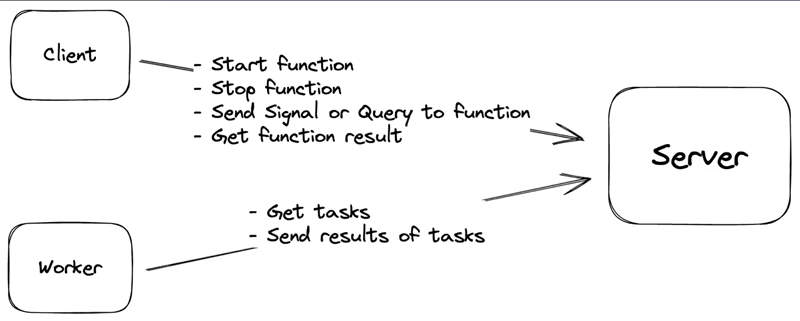
Temporal uses a similar durability model to Cadence. It splits work into Workflows and Activities, records progress in event history, and uses workers to execute the code.
- You can set timers or sleep functions for days or weeks
- You can pause workflows until external events or user approvals
- Temporal also supports robust schedules that can be paused, restarted, or altered as business conditions change.
That architecture gives Temporal strong recovery guarantees, but if you already have working agent code, you may need to restructure it around Temporal’s Workflow and Activity model.
Verdict: All three can avoid redoing completed durable work, but only when that work is placed inside the runtime’s durable boundary: Cadence/Temporal Workflow history and Activities, or Kitaru checkpoints.
Also read: Kitaru vs Temporal for Durable Execution
Feature 2. Code-First Workflow/Flow Definition
Defining the actual work is a major point of divergence. Some tools want you to build strict graphs. Others want you to write plain code.
Kitaru
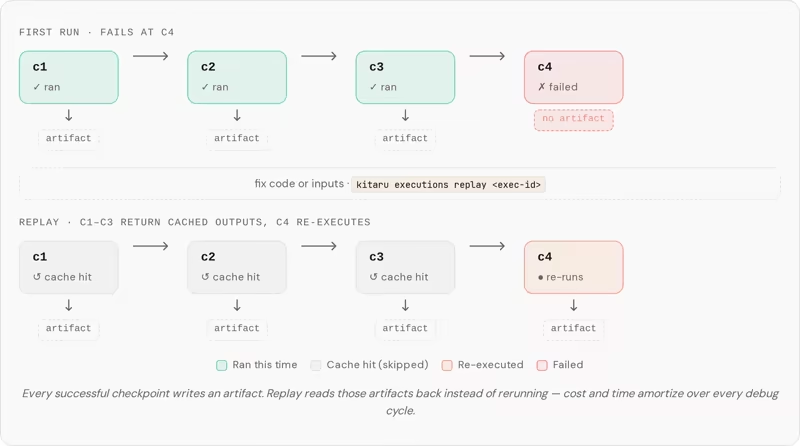
With Kitaru, you wrap the parts of your agent you want to protect with decorators like @flow and @checkpoint.
Every checkpoint becomes a durable save point. If the agent crashes after one of those steps, Kitaru restores the saved output and continues from the last checkpoint instead of starting the entire run again.
If your team is already using a framework, Kitaru adapts to it. Your agent framework doesn’t change.
Suppose you’ve built an AI agent using Pydantic AI or the OpenAI Agents SDK. The agent already has your prompts, tools, model configuration, and business logic. Kitaru sits underneath that code and adds checkpointing, replay, recovery, and long-running execution without replacing the framework you already use.
Without a runtime layer, you would need to build that recovery logic yourself. You would need to decide how to save progress, how to recover completed work, and how to avoid repeating expensive LLM or tool calls.
Kitaru gives you that layer while letting the agent branch at runtime, run in loops, and make decisions during execution. Since Kitaru recovers by returning saved checkpoint outputs, the code between checkpoints does not need to follow strict replay rules.
Cadence
Cadence pioneered the code-first workflow approach for backend services. You define the workflow as procedural Go code, while Cadence handles worker communication and state persistence behind the scenes.
But your workflow code has restrictions. As in, it must be deterministic. It also cannot call external APIs directly because those calls may return different results during replay.
All external work belongs strictly to activities. Activities handle operations, like database writes, API requests, file processing, or third-party calls.
For backend applications, that is a fair trade. For AI agents, however, it often means moving agent steps into activities and restructuring existing logic around Cadence’s Workflow and Activity model.
Temporal
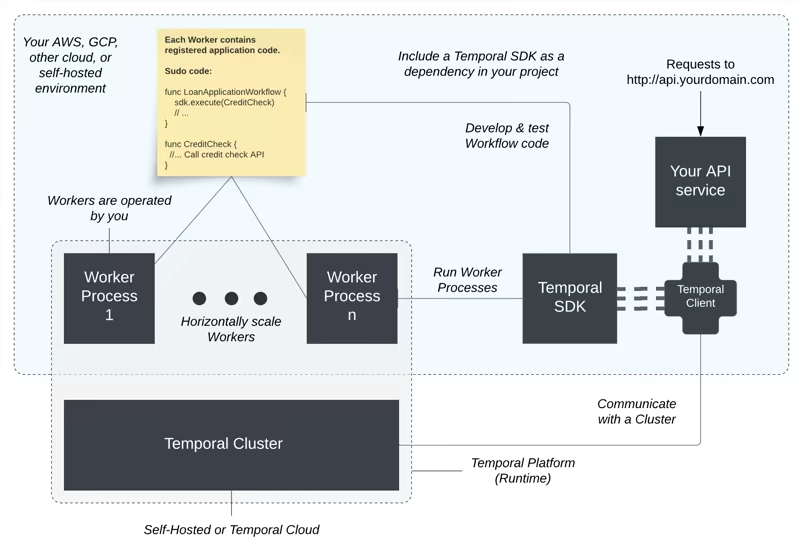
Temporal follows the same deterministic workflow principle as Cadence, but expands the developer experience across more languages.
You can define Workflows and Activities through official SDKs in languages like Go, Java, Python, TypeScript, PHP, .NET, Ruby, and Rust. The SDKs give you APIs for building Workflows, managing Workers, handling timeouts, and configuring retries.
This works well when your team is building a workflow system from the ground up. You get a clean structure for long-running work, and the runtime can recover execution after failures.
The question for AI teams is whether your agent naturally fits that split. If it does, Temporal can be a strong choice. If not, you may end up redesigning the agent around the runtime instead of adding durability to the agent you already have.
Verdict: Cadence and Temporal make sense when your team is ready to structure the system around Workflows and Activities. Kitaru asks for less restructuring when the starting point is an existing Python agent.
Feature 3. Long-Running Executions and Waits
Modern systems often need to stop and wait. They wait for human approvals, incoming webhooks, or scheduled delays. A good runtime holds that pause without burning CPU cycles.
Kitaru
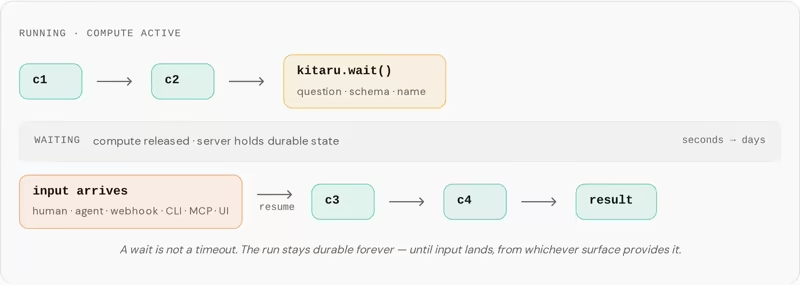
Kitaru has a built-in wait() primitive for human approval, external agent input, or webhook-style pauses.
It treats that pause as part of the agent run. When an agent hits wait(), the process can stop, release compute resources back to the cluster, and resume later from the same logical point. The runtime keeps the state in the database. When the needed input arrives days or weeks later, Kitaru restores the execution context and continues.
This is useful because human-in-the-loop work is common in AI agents. It’s not always a neat event at the edge of a product.
Sometimes the agent runs for 20 steps, reaches a risky decision, and needs a person before it continues. Kitaru treats that pause as part of the agent execution rather than a separate approval workflow you assemble outside the agent.
Also read: Kitaru vs DBOS
Cadence
import (
    "time"
    "go.uber.org/cadence/workflow"
)

func SleepWorkflow(ctx workflow.Context) error {
    workflow.GetLogger(ctx).Info("Workflow started, going to sleep for 30 seconds...")
    err := workflow.Sleep(ctx, 30*time.Second)
    if err != nil {
        workflow.GetLogger(ctx).Error("Sleep interrupted", "Error", err)
        return err
    }
    workflow.GetLogger(ctx).Info("Woke up after 30 seconds!")
    return nil
}
Code: https://cadenceworkflow.io/docs/go-client/sleep
Cadence supports durable sleep through workflow.Sleep. You can use the primitive to pause a workflow for a set duration. The sleep survives worker restarts or failures, and the workflow does not consume any worker resources while it sleeps. So technically, if you have millions of sleeping workflows, they have minimal impact on worker CPU use.
The tradeoff is still the workflow model. You need to design approval state, signals, timeouts, and activity boundaries inside Cadence.
Temporal
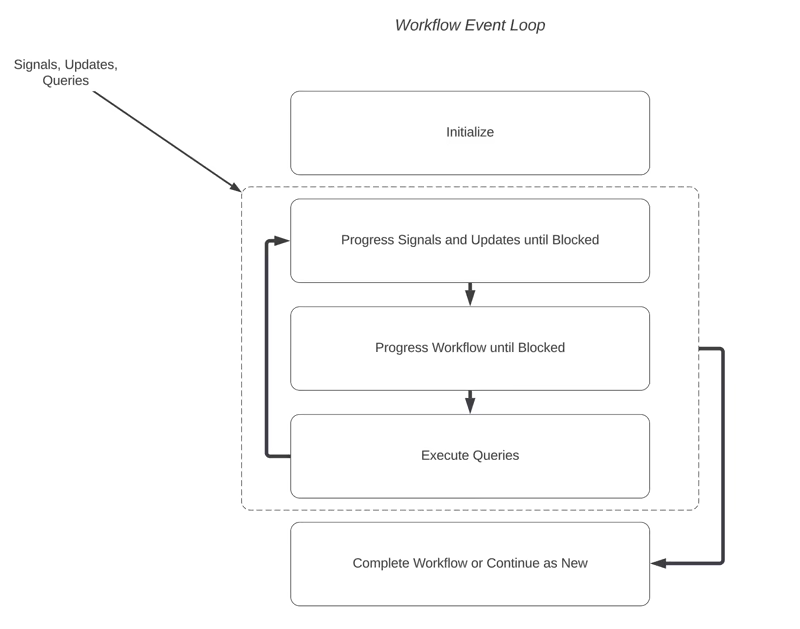
Temporal also supports long-running pauses. You can use durable timers to let a Workflow sleep for months or even years. These timers are persisted in the backend and do not keep the process running while the Workflow waits.
Beyond simple timers, Temporal supports Signals and Updates to handle external input:
- A Signal lets another system pass data into a running workflow.
- An Update lets another system modify a running workflow and return a response.
This combination makes Temporal strong for complex approval gates. For example, a compliance Workflow can wait for a reviewer, accept a decision through a Signal or Update, and then continue based on that decision.
However, you must model the approval state and write the message handlers yourself. If you are starting with an agent, it may add extra structure before the agent can wait safely.
Verdict: All three can pause work without keeping an active worker tied up. Cadence and Temporal give backend teams richer workflow messaging, but you must model the approval state and handlers. Kitaru is the simpler fit when the pause happens halfway through an agent run and should resume from the same checkpointed context.
Feature 4. Infrastructure Agnosticism
Infrastructure matters when agents touch sensitive data. If you’re in regulated industries, say finance, healthcare, defense, insurance, or enterprise environments, you’d need tight control over where workloads run and where data lives.
Kitaru
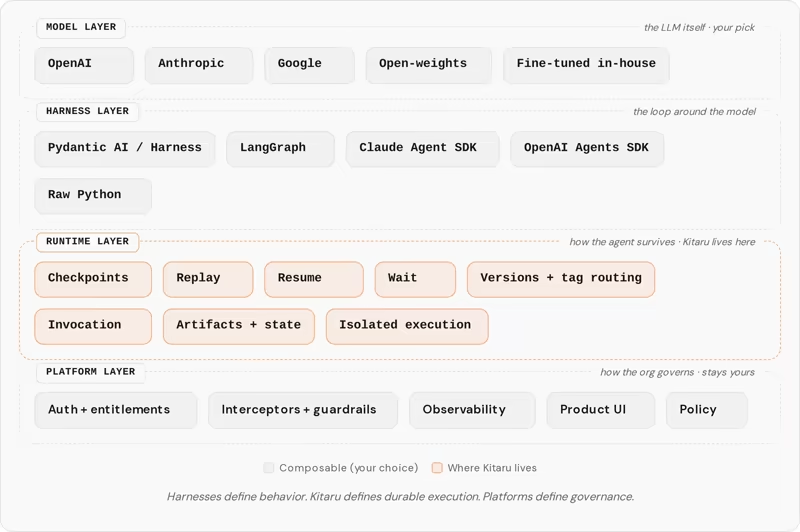
Kitaru lets you run the same agent across the infrastructure you already own. You can write your agent code once and run it locally for testing.
When you are ready for production, you change the target configuration, and Kitaru can run the workload on Kubernetes, Vertex AI, SageMaker, or AzureML.
Kitaru OSS is self-hosted and includes durable execution for Python agents, checkpoints, replay, wait/resume, dashboard, API, schedules, webhooks, and distributed execution. It also supports common cloud storage backends such as Amazon S3, Google Cloud Storage, and Azure Blob Storage.
Especially if you operate your own cloud infrastructure and need to keep sensitive workloads within your environment. Or you’re in regulated industries like finance, healthcare, and defense that have strict security and compliance requirements. This flexibility comes in handy.
By keeping runtime and agent data within your infrastructure, Kitaru gives you greater control over where workloads run and where data resides.
Cadence
Cadence follows a distributed architecture built around a central Cadence service and a pool of workers.
The Cadence service tracks workflow state, schedules tasks, and stores execution history. Workflow workers execute workflow logic. Activity workers handle outside work such as API calls, database updates, or file processing.
Because workflow state lives in the Cadence service instead of an individual worker, execution can continue if a worker crashes or gets replaced.
To support long-running, production workloads, Cadence also offers multiple persistence options. You can use databases such as Cassandra, MySQL, PostgreSQL, CockroachDB, or TiDB to store workflow state. You can also use Elasticsearch or OpenSearch for advanced visibility and workflow search.
Cadence does not have an official first-party cloud offering as Temporal does, so you should expect to self-host it or work with a managed provider.
The tradeoff is clearly operational complexity. Running Cadence in production means managing the service, workers, databases, and supporting infrastructure, which makes it a better fit when your team already has experience operating distributed systems.
Temporal
Temporal takes infrastructure separation a step further. It separates the Temporal Service from the Workers. The Workers execute Workflow and Activity code, poll Task Queues, and scale horizontally. The Temporal Service manages orchestration state and event history.
You have two paths. You can self-host Temporal, which means operating the Temporal Service and its supporting databases. Or you can use Temporal Cloud, where Temporal hosts the orchestration layer for you and charges based on usage.
In both cases, your code runs on your own Workers. That gives you control over where business logic runs, while Temporal Cloud removes much of the service ownership burden.
The tradeoff is cost and platform commitment. Self-hosting means operating the platform yourself. Temporal Cloud reduces that work, but usage-based billing can grow as workflow volume grows.
Verdict: Cadence gives you deep control over the service, databases, and worker setup, but your platform team owns more of the operations. Temporal lets you self-host or move service ownership to Temporal Cloud while your Workers remain in your environment. Kitaru is the narrower choice for Python-agent teams that want agent execution and artifacts inside their own cloud without operating a general workflow platform.
Cadence vs Temporal vs Kitaru: Pricing
Understanding the true cost of these platforms requires looking past the marketing pages. You also need to account for costs for model and tool calls, failed runs, operational overhead, and the engineering time spent building recovery logic yourself.
Kitaru
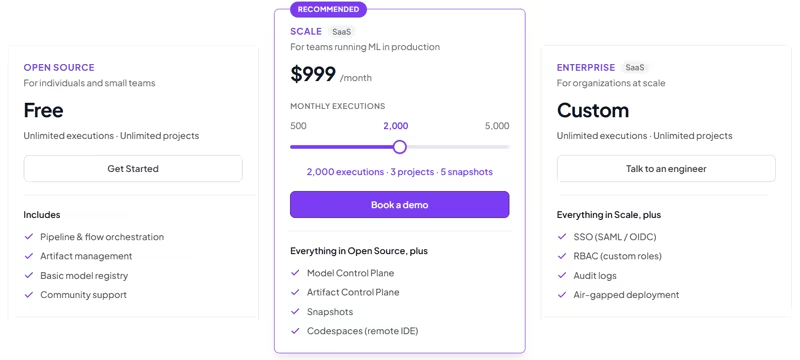
Kitaru’s full SDK is open-source under Apache 2.0 and free forever. Apart from the open-source version, we offer three plans. These plans give you access to both ZenML (for ML pipelines) and Kitaru (to run durable AI agents):
- 500 monthly executions: $399 per month. 1 project and 1 snapshot.
- 2,000 monthly executions: $999 per month. 3 projects and 5 snapshots.
- 5,000 monthly executions: $2,499 per month. 10 projects and 20 snapshots.
ZenML also offers an Enterprise plan with unlimited executions and projects for which you can talk to an engineer from our team.
Cadence
Cadence is free and open source, so there are no licensing fees to use the software itself. Your costs come from the infrastructure required to run it. That includes the Cadence service, worker processes, databases, monitoring, and the engineering effort needed to operate the platform in production.
For teams with a mature platform engineering practice, those costs may be a reasonable tradeoff for full control over the runtime and infrastructure.
Smaller teams, however, should factor in the ongoing effort required to deploy, scale, upgrade, and maintain the platform, not just the fact that the software is free.
Temporal
Temporal gives you two deployment options: self-host the Temporal Service or use Temporal Cloud.
If you self-host, the software is open source, but you still need to operate the Temporal Service, persistence stores, visibility infrastructure, monitoring, upgrades, and security yourself.
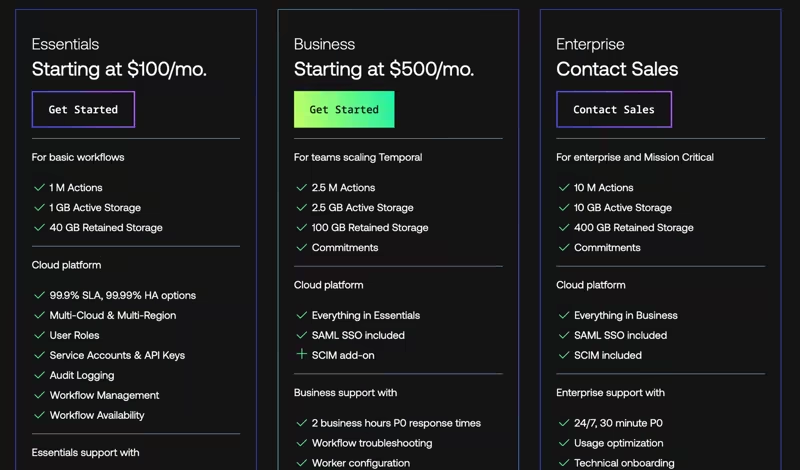
Temporal Cloud is consumption-based. Your bill combines usage-based consumption, mainly Actions and Storage, with a Temporal Cloud plan.
Temporal Cloud currently lists four plan tiers:
- Essentials: Greater of $100/month or 5% of Temporal Cloud consumption.
- Business: Greater of $500/month or 10% of Temporal Cloud consumption.
- Enterprise: Annual plan; contact sales.
- Mission Critical: Annual plan; contact sales.
Actions start at $50 per million before volume discounts. Storage is billed separately for Active Storage and Retained Storage.
👀 Note: Because Temporal Cloud bills primarily on Actions and Storage, AI agents that create many Workflow/Activity events, Signals, Updates, Heartbeats, or long Event Histories can increase the bill quickly.
Final Recommendation: Which One Should You Choose?
All three platforms are strong at what they were built to do. Your decision should come down to the shape of your workload and how much operational work you are ready to own.
- Choose Cadence if you are building an enormous internal platform and require absolute control over your scaling costs and database topology.
- Choose Temporal if your workload is a serious backend workflow system that demands a polished developer experience and managed cloud operations.
- Choose Kitaru if your workload starts as a long-running Python AI agent.
If your agents already call external tools, summarize large contexts, and wait for human input, Kitaru is usually the best fit when the workload starts as a long-running Python agent rather than a general backend workflow.
Start with the Kitaru open-source project to test the runtime in your own secure environment. Move to ZenML Pro when your team needs advanced access controls, audit logs, and commercial support across production agent operations.
What’s next: