
Open Source
Get started.
ZenML runs your ML and data pipelines. Kitaru keeps agents alive across crashes, waits, and retries. Plenty of teams run both.
Build your first pipeline
Install ZenML
Get ZenML up and running in minutes. You just need to install it
pip install 'zenml[local]'Track inputs and outputs
Wire two steps into a training pipeline — ZenML tracks every input and output as a versioned artifact:
from sklearn.base import ClassifierMixin
from sklearn.datasets import load_iris
from sklearn.svm import SVC
from zenml import step, pipeline


@step
def load_data() -> tuple[list, list]:
    X, y = load_iris(return_X_y=True)
    return X, y


@step
def train_model(X: list, y: list) -> ClassifierMixin:
    # The returned model is versioned + tracked as an artifact automatically.
    return SVC().fit(X, y)


@pipeline
def training_pipeline():
    X, y = load_data()
    train_model(X, y)


if __name__ == "__main__":
    training_pipeline()
Run your pipeline locally
Run it locally. The pipeline executes, artifacts are versioned, and the run shows up in your dashboard.
python run.pyZenML Architecture
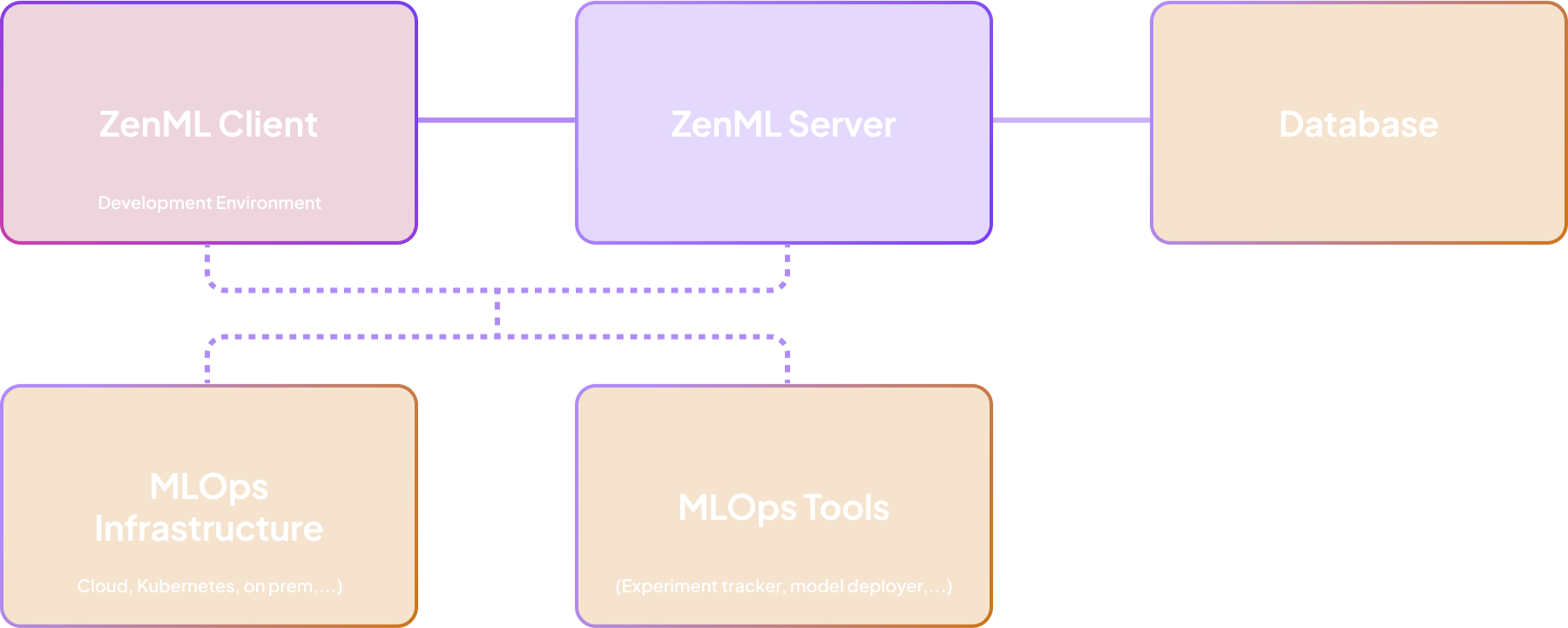
Built on a Robust Client-Server Architecture
ZenML is a metadata layer on top of your existing infrastructure, meaning all data and compute stays on your side.
Projects
Start with one of our ready-made projects
Everything you need to replicate a production-grade use case — demo, video, blog, and code.
BankSubscription Predictor
Predict bank clients most likely to subscribe to term deposits using machine learning.
Credit Scorer: EU AI Act Compliant MLOps
An end-to-end credit scoring workflow that automatically generates the technical evidence required by the EU AI Act.
EuroRate Predictor
Turn European Central Bank data into actionable interest rate forecasts with this comprehensive MLOps solution.
FloraCast
A production-ready MLOps pipeline for time series forecasting using ZenML and Darts, featuring TFT-based training and scheduled batch inference.
GameSense: The LLM That Understands Gamers
Elevate your gaming platform with an AI that translates player language into actionable data. A model that understands gaming terminology, extracts key attributes, and structures conversations for intelligent recommendations and support.
Magic Photobooth
A personalized AI image generation product that can create your avatars from a selfie.
Resources
Your Complete ZenML Learning Toolkit
Dive deeper into ZenML with comprehensive documentation, development tools, hands-on tutorials, and a thriving community of ML engineers ready to help you succeed.
Official Documentation
Comprehensive guides, tutorials, and API reference to master ZenML
VS Code Extension
ZenML Studio enhances your ML workflow with support for pipelines, stacks, server management and DAG visualization.
Interactive Tutorial
Master ZenML fundamentals through 10 guided pipeline examples with step-by-step tutorials and one-click execution!
Slack Community
Join thousands of ML engineers sharing knowledge and best practices.
Pause for a human, survive a crash
Install Kitaru
Get Kitaru up and running in minutes. You just need to install it.
uv add kitaruAdd a human-in-the-loop gate
Wrap an agent you already have, checkpoint the expensive calls, and wait for a human before anything ships:
from kitaru import flow, wait
from kitaru.adapters.pydantic_ai import KitaruAgent
from pydantic_ai import Agent

# KitaruAgent turns PydanticAI model + tool calls into replayable checkpoints.
agent = KitaruAgent(Agent("openai:gpt-5-mini", system_prompt="You draft customer replies."))

@flow
def support_flow(ticket: str) -> str:
    reply = agent.run_sync(f"Draft a reply to: {ticket}").output
    approved = wait(schema=bool, question=f"Send this?

{reply}")
    return reply if approved else "escalated to a human"

if __name__ == "__main__":
    print(support_flow.run("my invoice is wrong").wait())
Run it, walk away, resume it
Run it. It pauses at the approval gate and releases compute. Answer hours later and it resumes from where it stopped — no idle container, no lost work.
python flow.pyThe brain and the hand should not have to share a process.
The runner owns durable control flow — checkpoint order, state, retry, replay, resume, and wait. Execution targets do the work: inline, in an isolated job, inside a sandbox, or through an external tool. Checkpoints are the contract between them.
import kitaru
from kitaru import flow, checkpoint

@flow
def coding_agent(issue: str) -> str:
    plan = analyze_issue(issue)
    patch = write_code(plan)

    # Pauses. Resumes when input arrives.
    approved = kitaru.wait(
        bool, question="Merge this PR?"
    )
    if approved:
        merge(patch)
    return patch
Resources
Your Complete Kitaru Learning Toolkit
Docs, examples, and a community building production agents — start where you are.
Kitaru Docs
Primitives, APIs, and recipes for building production agents.
GitHub Repo
Star, file issues, and read the source on github.com/zenml-io/kitaru.
From ZenML to Kitaru
Why we built a separate runtime for agents — and what it does for you.
Slack Community
Join engineers shipping production agents — get help, share patterns.
Ready for the next level?
Run ML pipelines or agent flows on a managed control plane. RBAC, audit logs, and dedicated support.